
SABORPOS · THE COMPLETE RESTAURANT PROGRAM
Every part of the operation.
One connected program.
From the guest’s first choice to the ingredient behind the meal, the report behind the decision and the people behind the launch. Explore the full restaurant scope delivered through PayBOTX Client Solutions Group.
Use the program.
Explore the demonstration.
This guide describes the complete restaurant program and delivery scope. Client Solutions Group confirms the customer’s selected modules, integrations, equipment, rollout and service agreement.
The working demo: SaborPOS includes a staff register and the Casa del Sabor customer-ordering experience. Staff access requires authorized sign-in. The current customer portal uses simulated card approval without charging a card or recording actual card tender. Payment processing, marketplace adapters, camera connections and automatic cloud printing require their specific implementation and verification.
The complete solution
01A complete restaurant operating solutionThe complete solution
Fast service. Complete food costing. Accountability across every restaurant.
Serve
Every ordering channel
Control
Every ingredient and recipe
Lead
Every store and franchise
Casa del Sabor + SaborPOS
Installed, commissioned and supported by PayBOTX Client Solutions Group
Link to this topic02One operating model. Three priorities.The complete solution
The restaurant program brings order speed, food economics and franchise visibility into one connected restaurant solution.
Serve faster
An order-entry design that brings the major modifiers together on a single screen. Staff select the meal and its options while staying focused on the guest.
Control food economics
Ingredient, recipe, portion, yield, packaging, production and waste costs. Compare a specific store with the region, the franchise, all franchises and company-owned stores.
Act with visibility
Drill-down tax, food and marketing reports, shift and crew comparisons, and McCamera escalation when ticket times fall behind.
Connected fulfillment and replenishment
Website, pickup, table and delivery orders feed restaurant execution. Sales-driven ingredient demand supports automatic purchasing from warehouses and multiple supply sources.
PayBOTX Client Solutions Group installs the POS devices and peripherals, makes them work, and manages 24/7/365 support with a 30-minute response and on-site service when necessary.
Link to this topicServe every guest
03One screen keeps the order movingServe every guest
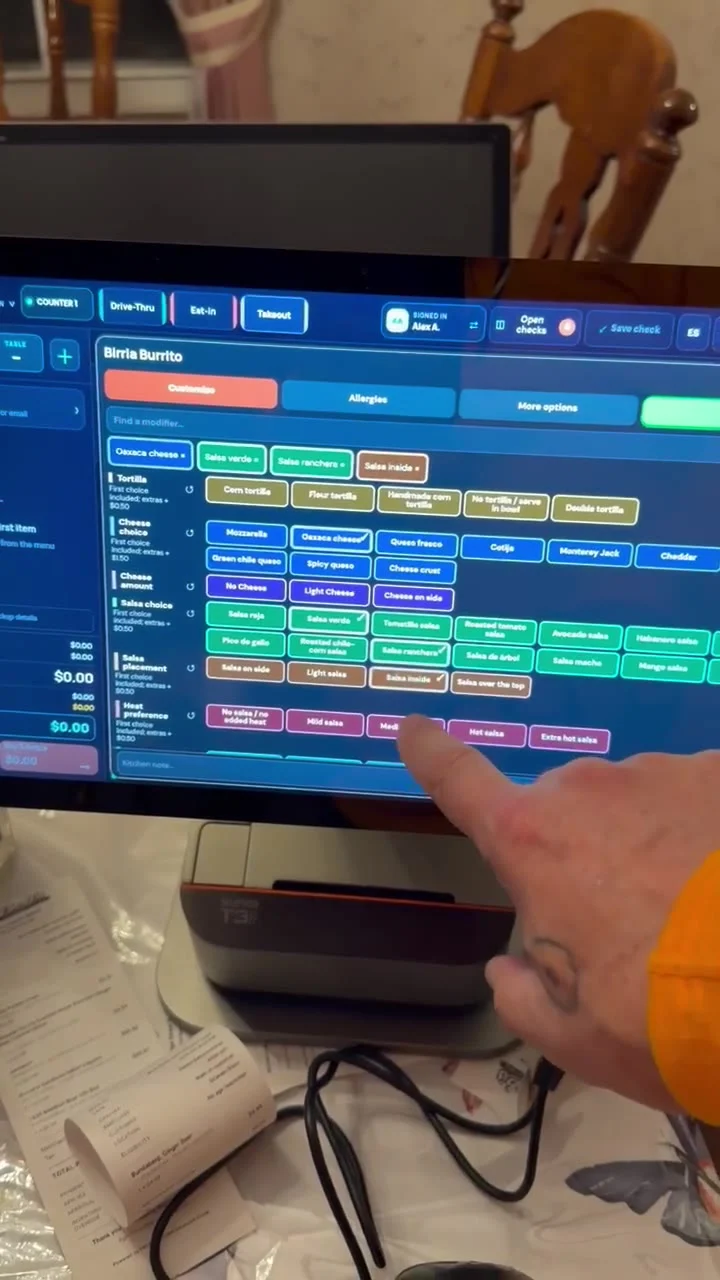
The order-taking conversation can continue while the operator makes selections in one working view.
Single-screen ordering demonstration: tortilla, cheese, salsa, placement and heat preferences in the same modifier workspace.
Fewer screen changes during the order
Staff can see related choices together, make selections directly and keep the customer’s order in context.
Speed with the requested detail intact
Portions, additions, substitutions, allergens and preparation instructions remain associated with the item and its kitchen ticket.
04Every ordering channelServe every guest
The restaurant’s delivery includes the complete set of restaurant and digital service channels.
Eat-in and table orders
Customer or table identification, menu choices, modifiers, kitchen routing and a clear service handoff.
Takeout and drive-through
Distinct service profiles, fast entry, order notes and visible fulfillment labels.
Website and pickup
Branded customer ordering, persistent cart, pickup instructions, confirmation and direct entry into the restaurant workflow.
Direct delivery
Customer profile, address, contact information, payment and delivery instructions with the order.
Delivery marketplaces
DoorDash, GrubHub and Uber Eats order workflows with channel identification for kitchen execution and management reporting.
Automatic order flow connects the guest-facing channel with open checks, kitchen execution and fulfillment. Staff work from the same order record.
Link to this topic05The customer portalServe every guest
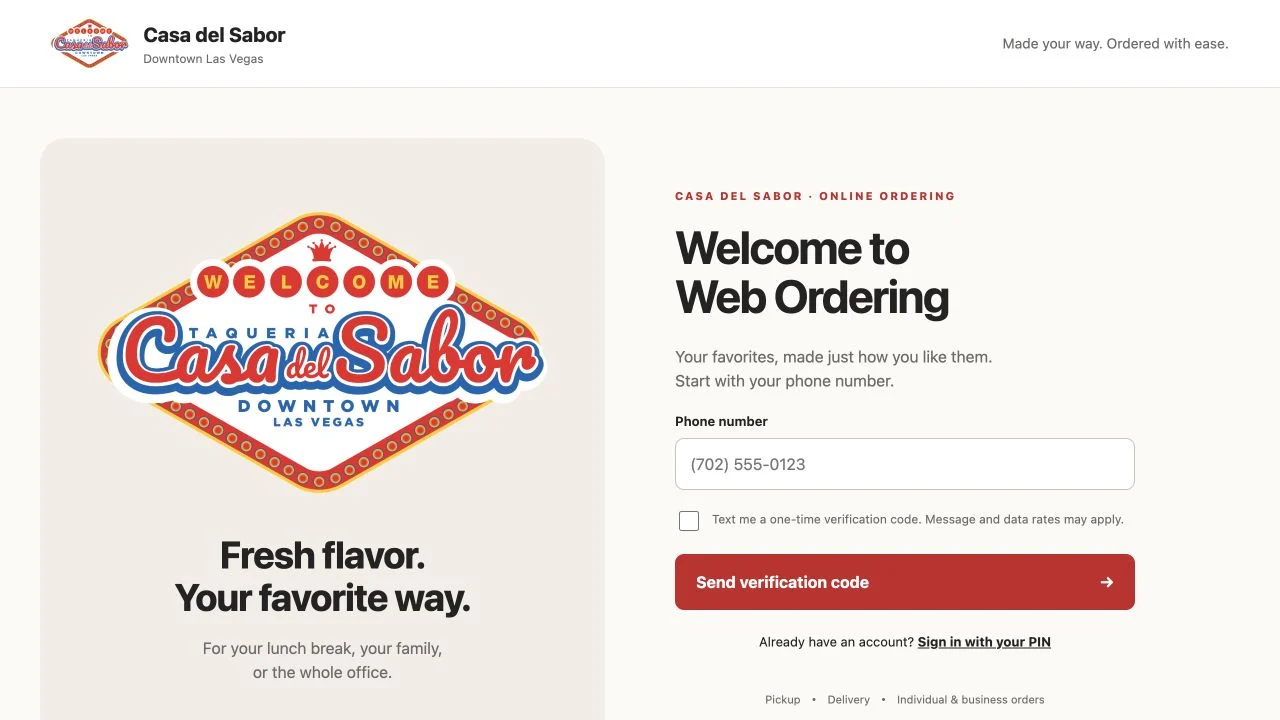
Casa del Sabor customer portal. The platform applies the restaurant’s branding, menu and operating standards.
Simple access and returning-customer convenience
Phone verification, six-digit PIN, SMS recovery, customer profiles and delivery addresses. Business details support office and larger group orders.
The same menu logic as the restaurant
Departments, products, quantities, required and optional modifiers, notes and persistent cart editing keep the customer’s choices consistent.
A continuous customer record
Pickup or delivery review, order confirmation and order history connect the customer experience to restaurant service.
06The whole order reaches the kitchenServe every guest
The kitchen receives the item, the instructions and the service context required to prepare and hand off the order.
RECEIVE PREPARE HAND OFF
Kitchen display system
Product-to-station routing, kitchen queues, preparation states, changed-item handling and rerouting coordinate work across the line.
Kitchen and beverage printing
Tickets carry quantities, selected modifiers, preparation instructions and order notes to the appropriate station. Guest checks and receipts complete the document flow.
Clear service identification
Eat-in, takeout, drive-through, Web Pickup, Web Delivery and marketplace identification distinguish the destination of each order.
Changes stay with the order
Staff preserve customer, table, server, driver and handoff information as the order moves through preparation.
Service times become a management signal
Ticket-time monitoring connects execution to McCamera escalation, helping managers respond when the restaurant falls behind.
Link to this topicControl the food operation
07Complete food costingControl the food operation
THE OPERATING ADVANTAGE
Every store. Every region. Each franchise. All franchises. Company-owned restaurants.
Ingredient and supplier
Pack and unit cost, effective prices, usable yields and supply-source comparisons.
Recipe and portion
Nested recipes, batch output, serving size, modifiers, substitutions and packaging.
Restaurant and shift
Actual use, theoretical use, waste, production results and food-cost performance.
Region and franchise
A specific store against comparable stores, the regional total, the franchise and the company-owned estate.
Know the cost. Compare the result. Choose the action.
Link to this topic08Inventory and automatic replenishmentControl the food operation
Automatic purchasing connects what the restaurant sells with what it needs to replace.
Sell the product
The sold item and its selected modifiers determine recipe ingredient demand.
Update ingredient use
Raw ingredients or prepared inventory reflect the quantity required by the sale.
Evaluate replenishment
Available stock, par levels, reorder rules and planned demand identify the replacement requirement.
Source the ingredients
Automatic purchase and replenishment workflows draw from one warehouse, multiple warehouses or approved supplier sources.
Receive and reconcile
Shipment, receipt, actual quantity, cost, lot and expiry information complete the inventory record.
Multiple sources, one ingredient standard. Supplier SKUs, pack sizes, ingredient-specific conversions, price history and supplier comparisons keep purchasing and recipe units aligned.
Link to this topic09Yield and wasteControl the food operation
ILLUSTRATIVE EXAMPLE / 10 LB ROAST / $50 INGREDIENT COST
10 lb
Purchased weight
8 lb
Usable output
80%
Measured yield
Usable output: 8 lb Trim / cooking: 2 lb
Usable cost per pound $50.00 / 8 lb = $6.25 per usable lb 4 oz portion 32 portions from the usable roast = $1.5625 per portion Cost adjustment Usable cost is 25% higher than the $5.00 purchase cost per lb
The cost change follows the ingredient
Apply measured yield to the ingredient’s usable cost and to the current recipes and menu items that consume it.
Separate planned yield from operating loss
Track expected trim and cooking loss, then measure additional waste and production variance. SaborPOS can apply the same discipline to its proteins, rice, beans and prepared sauces.
Link to this topic10Recipes and portion standardsControl the food operation
A consistent recipe standard gives the kitchen a working instruction and management a dependable cost basis.
DEFINE
Complete recipe definitions
Ingredients, nested subrecipes, batch sizes, portions, preparation instructions, photos, videos, allergens and printable recipe cards.
CONTROL
Controlled changes
Drafts, revisions, approvals, effective dates, historical versions, location variations and approved substitutions preserve the restaurant’s standards.
COST
Cost at every level
Ingredient, batch, portion and plate cost, with packaging and optional production labor. Current, standard and historical cost views support different management questions.
SCALE
Scaled preparation
Adjust recipe quantities for the production requirement while retaining the same ingredient and portion relationships.
DISTRIBUTE
Central standards with local execution
Distribute approved recipe packages, apply local costs and preserve location-level review. A shared salsa or protein recipe can support several menu items.
Link to this topic11Product mix and menu engineeringControl the food operation
Managers can compare item performance across stores, regions, service channels and dayparts.
MANAGEMENT VIEW INCLUDED ANALYSIS
Demand and revenue
Units sold, net sales, discounts, sizes, modifiers, combos and substitutions.
Food contribution
Recipe cost, packaging, food-cost percentage and contribution by item and category.
Menu engineering
Popularity versus contribution, category-aware rankings, zero-sale items and weighted food-cost percentage.
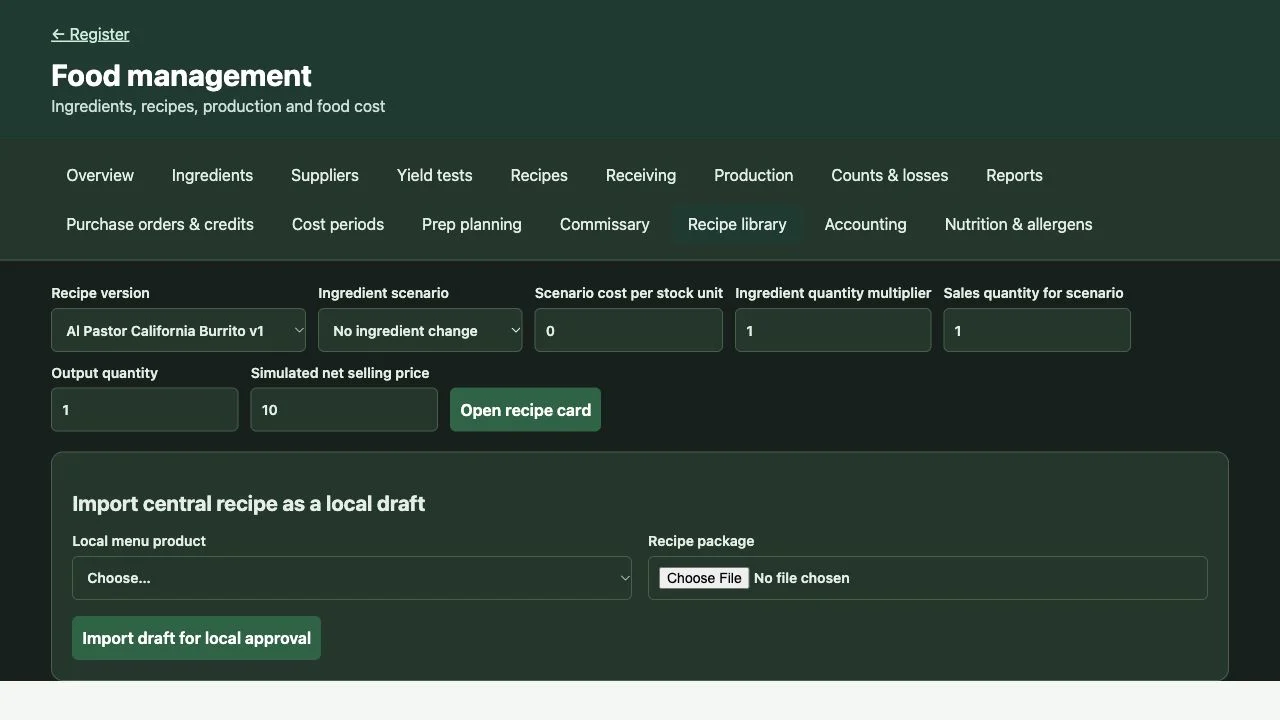
What-if analysis
Ingredient price, portion quantity, selling price and sales-volume scenarios.
Historical explanation
Sale-time recipe and cost snapshots, recorded refunds and ingredient or modifier drill-down.
Recipe scenario workspace: compare ingredient cost, portion multiplier, selling price and sales quantity.
12Prep, production and commissaryControl the food operation
Food management links forecasts, ingredients, prepared batches and movement between restaurants.
PLAN
Forecast and prepare
Sales forecasts, prep requirements, planned batch sizes and scaled recipes organize work before the rush.
PRODUCE
Measure the batch
Actual inputs, measured output, yield variance and expiration dates describe what the kitchen produced. Prepared stock remains connected to its ingredient basis.
EXPLAIN
Track waste and losses
Waste, spoilage, staff meals, supplier returns and stock adjustments provide a clear explanation of inventory movement.
TRANSFER
Coordinate central production
Commissary production, storage, shipments, transfers and restaurant receipts support central preparation and multiple destinations.
RECONCILE
Reconcile actual and theoretical use
Match expected recipe consumption to inventory-based use across the same period. Review explained losses and remaining differences with transaction drill-down.
Link to this topic13Nutrition and allergy managementControl the food operation
Low fat. Low salt. No dietary preference. Allergy information belongs with the order and the recipe.
LOW FAT LOW SALT NO PREFERENCE
Capture the guest’s preference
Provide clear choices for low fat, low salt or “Don’t care / no preference,” alongside allergy and preparation information.
Connect preference to the kitchen
Carry the selected preference and item instructions into the kitchen workflow so preparation staff can see the request.
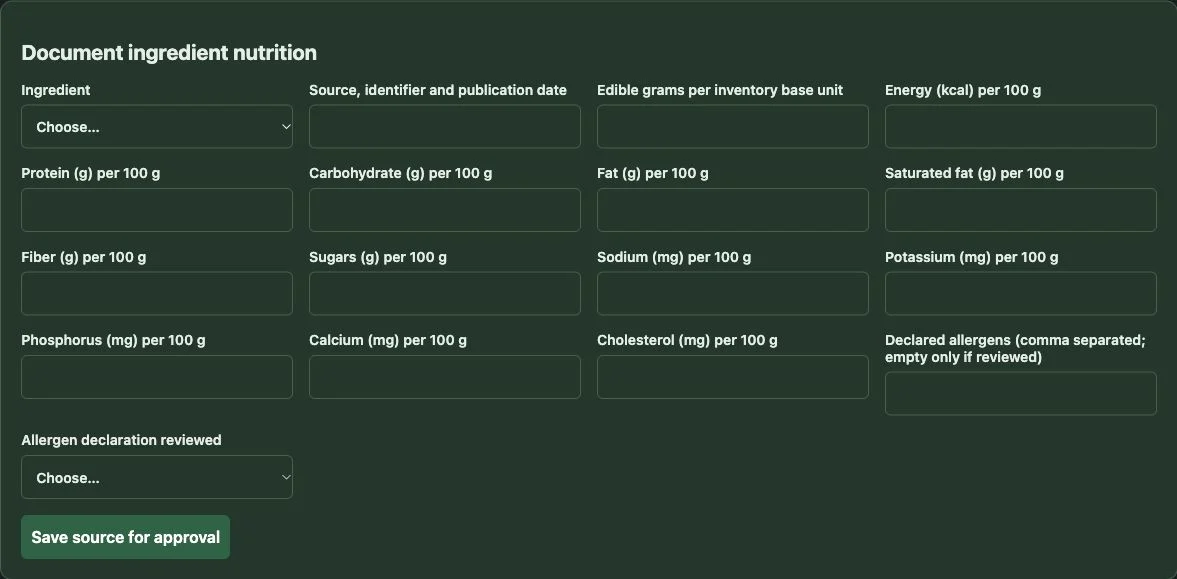
Maintain the ingredient evidence
Document nutrition sources, edible quantities, declared allergens and reviewed recipe information. Source review and recipe versions retain the basis for menu information.
Food-management source view: ingredient nutrition and allergen documentation.
Lead with visibility
14Enterprise reportingLead with visibility
Drill down from all restaurants to a region, franchise, individual store and the transaction underneath the result.
Specific store
This restaurant’s sales, food cost, yield, waste, service times and operating trends.
Stores in a region
One store against regional peers and the regional total.
A franchise
Restaurant performance within the selected franchise or operator-owned business.
All franchises
A consistent view across the franchise network, with detail by franchise and store.
Company-owned stores
Our stores as a group, an individual company store and comparisons with the wider estate.
Comparable measures, useful detail. Use a common definition of sales, food cost and service time. Filter by period, shift, crew, menu category or ordering channel, then investigate the underlying order or inventory transaction.
Link to this topic15Shift and crew performanceLead with visibility
Identify strong operating performance and use it to develop the rest of the organization.
Which crew is performing best?
Compare food cost, yield, waste, portion consistency and ticket times for the selected shift.
Where does performance change?
Compare opening, lunch, dinner or closing periods within the store and across comparable restaurants.
What explains the difference?
Drill into product mix, sales volume, preparation batches, ingredient use and recorded losses.
Which operator sets the standard?
Compare company-owned stores and franchise/operator-owned businesses using the same operating measures.
Turn a comparison into coaching
Find the crew or operator that consistently delivers strong food-cost and service results, examine the practices behind that result, and apply them elsewhere.
Keep the comparison meaningful
Read crew performance alongside sales volume, menu mix and service channel so managers can understand the operating context.
Link to this topic16Tax, food, marketing and operating reportsLead with visibility
Leadership receives a broad view of performance with a clear route to the details.
REPORT FAMILY INCLUDED MANAGEMENT FOCUS
Tax reports
Taxable sales, tax collected, adjustments and reporting by store and selected period.
Food reports
Ingredient costs, purchasing, yields, actual/theoretical use, waste, product mix, contribution and variance.
Marketing reports
Customer activity, repeat ordering, menu preferences, channel performance and promotional sales results.
Operating reports
Orders, completed checks, payments, tips, service times and performance by shift, crew, region or franchise.
Accounting reports
Inventory movements, cost periods, account mappings, preserved journals and accounting exports.
Specific store versus all stores. Specific store versus its region. One franchise versus the franchise network.
Link to this topic17McCamera service escalationLead with visibility
Mark Yelen’s McCamera approach connects service-time exceptions with management escalation and real-time camera review.
Store personnel
Notify the restaurant team when ticket times exceed the service threshold.
General Manager
Escalate a continuing delay to the GM for immediate attention and local coordination.
Regional Manager
Notify the RM when the issue needs broader management intervention.
Owner
Escalate to the owner, who can pull up the restaurant cameras and evaluate the situation in real time.
See what is happening while it matters
Authorized leaders can use the camera view to assess the line, identify the service bottleneck and decide what support the team needs.
Connect observation to action
The operating sequence links a slow ticket, the escalation recipient, camera review and corrective action, with service thresholds and escalation timing set to the restaurant’s standards.
Link to this topicDeliver and support
18The organization behind the solutionDeliver and support
PayBOTX combines a broad payments organization with a private Client Solutions Group for complex restaurant programs.
1,000+
People across the broader employee and consultant network.
2008
Serving businesses since 2008. Founded by payment and technology professionals.
Nationwide resources
Card processing, POS hardware and software, virtual terminals and gateways. National delivery through sponsor-bank and ISO partnerships, supported by a broad professional network.
Processing relationships
Access to major payment-processing platforms supports acceptance of Visa, Mastercard, Discover and American Express, connecting restaurant payments with established infrastructure.
Experienced leadership
Mark Yelen and Nathan Barnes head the private Client Solutions Group. Both have spent much of their careers managing large-scale projects, from requirements and coordination to installation and ongoing service.
Accountable support
Client Solutions Group manages all SaborPOS support: remote assistance, escalation and on-site service. The group owns the 24/7/365 commitment and 30-minute response, coordinating the people needed to resolve issues.
Company background: PayBOTX company story and brochure.
Link to this topic19Restaurant project leadershipDeliver and support
Mark Yelen, Project Director
10
YEARS
With McDonald’s developing restaurant technology
POS, food costing and product mix
A decade of McDonald’s experience developing POS software, food-costing and product-mix capabilities, alongside work with other franchises.
Developer of the McCamera system
McCamera translates POS and store problems into notifications, video snippets and live camera views so managers, general managers, regional managers and owners can provide guidance and coaching. This McDonald’s and fast-food expertise began 15 to 18 years ago, expanded through the McCap mobile experience 10 years ago, and has since informed work across many other franchises.
McDonald’s OTP3 certification
Certificate C0810351, dated June 27, 2012, documents advanced NP6 troubleshooting and repair training. The project director identifies OTP3 as McDonald’s highest technology certification at the time.
Restaurant software, the equipment around it and the operational response belong in the same conversation.
Link to this topic20A station experience that fits the teamDeliver and support
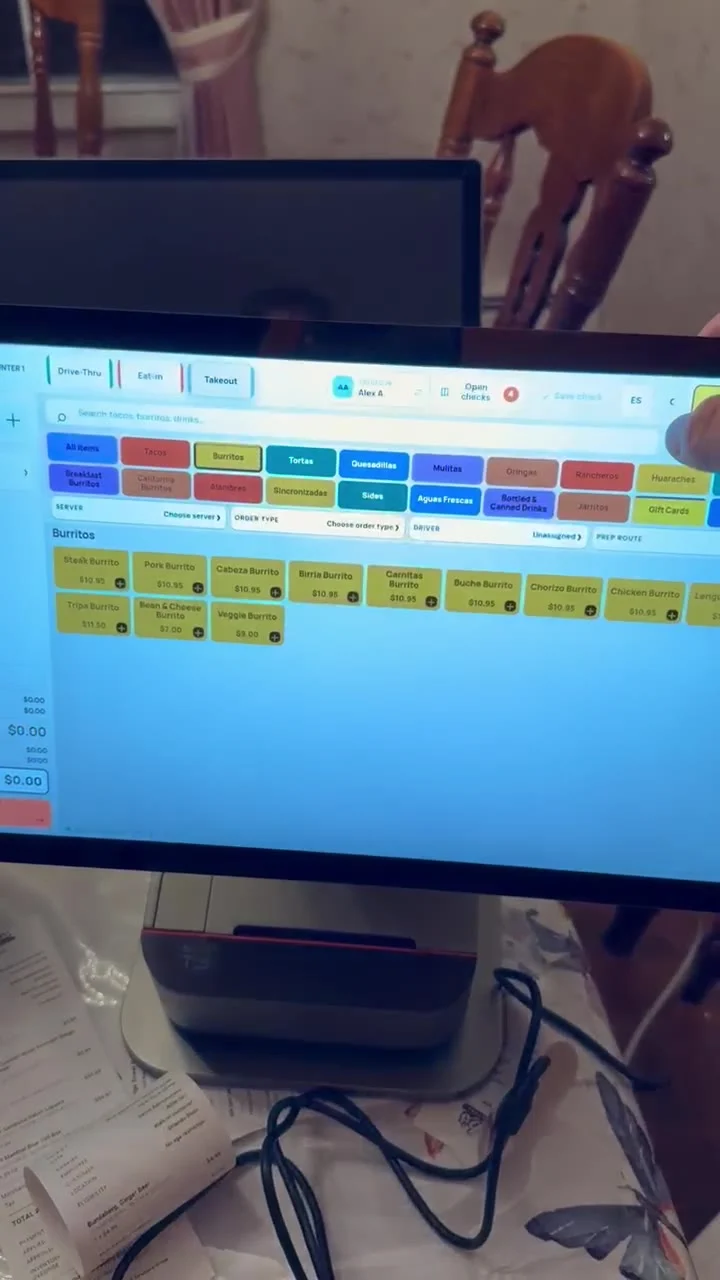
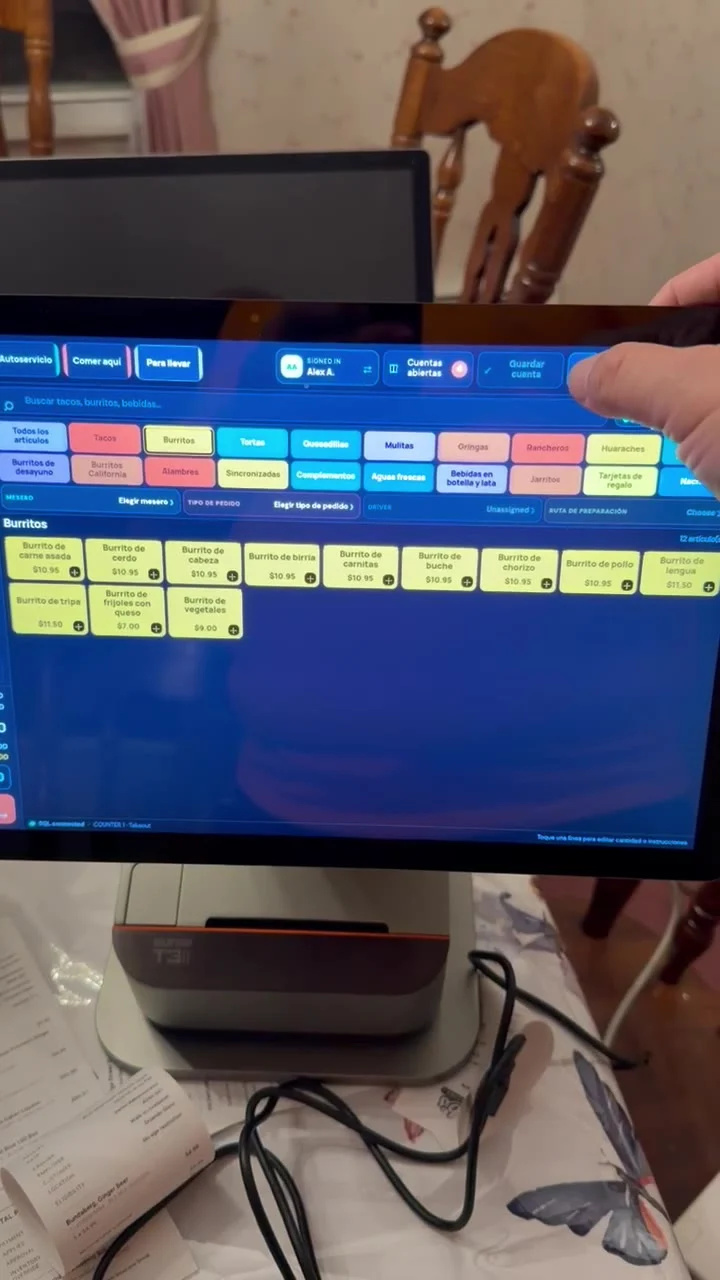
English and Spanish, day and night appearance, and visible button choices help each station fit the way the team works.
01 / LIGHT APPEARANCE Station demonstration: light appearance and menu selection. 02 / SPANISH SERVICE LABELS The demonstration shows Spanish service labels, departments and menu names.
Station preferences remain independent of employee login. Compact Android layouts preserve quick access to ordering and payment controls.
21The connected platformDeliver and support
The platform brings together quick-service order entry, customer access and the complete food operation.
CDS Restaurants
Mexican menu structure, proteins, toppings, sauces, bilingual service and customer web ordering.
SaborPOS
Compact restaurant registers, Android station layouts, check handling, employee access and kitchen routing.
Lobster food-management foundation
Recipe and ingredient costing, catch weight, purchasing, usable yield, production and inventory-linked sales.
Coffee-shop operating patterns
Fast counter service, drink sizes, modifiers, portion recipes, packaging and repeat-customer ordering.
Business continuity across the workflow. Customer profiles, addresses, gift cards, staff roles, transaction history and station settings sit alongside menu, order, inventory and management records.
Link to this topic22Installation and launchDeliver and support
PayBOTX Client Solutions Group brings the team, installs the equipment and takes responsibility for making the complete workflow work.
Prepare the restaurant
Coordinate the station plan, network, menus, recipe standards, warehouse sources, reporting structure and fulfillment routes.
Install the equipment
Install and configure every point-of-sale device and its assigned peripherals, including kitchen displays, kitchen printers and receipt printers.
Commission the operating workflow
Run orders through entry, modifiers, table or fulfillment assignment, kitchen execution, payment, printing and customer handoff on the installed equipment.
Train the people who use it
Cashier, kitchen and manager training focuses on real operating tasks, including food management and reporting.
Own the launch
A named Client Solutions Group project lead coordinates go-live and the transition to the group’s ongoing support team.
Installation and launch are managed by PayBOTX Client Solutions Group.
Link to this topic23The Client Solutions Group support commitmentDeliver and support
24 / 7 / 365
Every hour. Every day of the year.
30
MINUTE RESPONSE
PayBOTX Client Solutions Group responds within 30 minutes and takes ownership of the support issue.
On-site when necessary.
Web-based applications allow most diagnosis and support to happen remotely. When an issue requires an on-site visit, PayBOTX Client Solutions Group arranges and manages that service.
All remote and on-site support is managed by PayBOTX Client Solutions Group.
Link to this topicComplete capability reference
24Food-management capability referenceComplete capability reference
CAPABILITY FAMILY INCLUDED SCOPE
Ingredients and yield
Ingredient master, supplier SKUs, multiple suppliers, pack sizes, unit conversions, catch weight, substitutions, price history and trim/thaw/cook/portion yields.
Recipes and costing
Nested recipes, batches, portions, media, allergens, scaling, approvals, effective versions, local variants, ingredient/plate/packaging/labor cost and target margins.
Product mix
Units, net revenue, discounts, modifiers, sizes, combos, contribution, category rankings and price/portion/ingredient/sales-mix scenarios.
Prep and inventory
Forecasts, prep lists, actual inputs, measured output, prepared stock, lots, expiry, counts, storage, transfers, waste, spoilage and staff meals.
Purchasing and supply
Pars, automatic warehouse replenishment, multiple sources, vendor comparisons, purchase approvals, partial receipts, invoices, discrepancies, credits and returns.
Multi-location control
Central recipes, local costs, commissary production, shipment/receipt, location comparisons, actual/theoretical analysis, period close, journals and exports.
Link to this topic25Service and management capability referenceComplete capability reference
CAPABILITY FAMILY INCLUDED SCOPE
Register and checks
Single-screen modifiers, product search, quantities, notes, saved/open checks, customer/table/server/driver assignment, partial payments, tips, settlement and sales history.
Guest channels
Eat-in, takeout, drive-through, website, pickup, table and delivery ordering, with DoorDash, GrubHub and Uber Eats workflows.
Customer portal
Phone verification, PIN access, recovery, personal/business profiles, delivery addresses, persistent carts, order review, confirmations and history.
Kitchen and documents
KDS queues, routing, rerouting, changed items, preparation status, kitchen tickets, guest checks and receipts.
Operating intelligence
Tax, food and marketing reports, franchise/region/store drill-down, shift/crew comparison, company-owned and operator-owned store views, and McCamera escalation.
People and service
Staff roles, audit history, gift cards, station-specific preferences, English/Spanish, day/night; installation, training, 24/7/365 and on-site support managed by Client Solutions Group.
Link to this topic26The complete SaborPOS programComplete capability reference
The complete SaborPOS restaurant solution At the counter
A fast order-entry experience with the important modifiers together, connected to every guest ordering channel.
Across the food operation
Complete food costing, automatic replenishment, recipes, yields, production, inventory, product mix and waste.
Across the organization
Store, region and franchise drill-down, shift and crew comparisons, and McCamera service escalation.
Behind the operation
PayBOTX Client Solutions Group leads the project, installs every device and peripheral, and manages 24/7/365 support with a 30-minute response.
PAYBOTX CLIENT SOLUTIONS GROUP
Link to this topicA complete scope.
A team to make it work.
Use the live model to begin the conversation. Bring the restaurant’s requirements to Client Solutions Group to define the delivery plan.
Introduce an opportunity ↗